Wednesday, January 27, 2016

SQL - optimize peformance by limiting table full scans


There's an excellent article here about using the PIVOT/UNPIVOT keywords in Oracle to organize and report data:
https://dzone.com/articles/impress-your-coworkers-by-using-sql-unpivot

However, I think the most interesting message here is how to limit your full table scans and thus enhance the DB access performance. So, read on ! Thanks Lukas Eder for the great article !

Saturday, July 5, 2014

Could you be .... the most beautiful bug in the world ....


That's right. I've spent almost 3 weeks to fix a bug which has been haunting me all this time, but now it looks like the most "beautiful" I've ever encountered.

The context

We have an nUnit test for a medical streaming application that basically reads volumes (depicting body parts) from a disk, loads them in memory and them streams them to the rendering pipeline to be displayed on the screen.
The test consists of two parts:
1. initialization - where, among others, we force garbage collection, by calling GC.Collect(2)
2. the streaming itself, during which we perform some measurements; one of these is the number of generation 2 collections, which should stay on 0 for the whole duration of the streaming (we tolerate only generation 0 and 1 collections, but since generation 2 collections are expensive, we absolutely want to avoid them occurring during our streaming); let's call this measurement GC2; so we expect GC2 = 0

The issue I faced was that suddenly GC2 was 1, so the test was failing because of that.

The approach

First I used .NET Memory Profiler 4.5 to analyze my nUnit test. But before doing that, I needed to run nUnit in process, because otherwise it was starting the nunit-agent.exe process and then I was analyzing the wrong process. In order to run nUnit (version 2.6.2) in process, I changed the nunit-x86.exe.config like this:

<?xml version="1.0" encoding="utf-8"?>
<configuration>
  <startup useLegacyV2RuntimeActivationPolicy="true">
    <supportedRuntime version="v4.0.30319" />
  </startup>

  <runtime>
    <legacyUnhandledExceptionPolicy enabled="1" />

    <loadFromRemoteSources enabled="true" />
    
    <assemblyBinding xmlns="urn:schemas-microsoft-com:asm.v1">
      <probing privatePath="lib;addins" />
    </assemblyBinding>
  </runtime>
</configuration>


With this in place, I could analyze the nunit-x86 process and noticed the garbage collection pattern as in the figure below:


As I said, I knew that during the initialization phase we triggered several generation 2 collections and on top of those there was another one causing the test to fail. How to identify it ?
And then I've got this simple idea: I measure the number of collections of gen 2 at the beginning of the streaming (after all initialization has taken place) and then, for each sample streamed during the test, I count the number of gen 2 collections again and if it increased, I produce a beep:

g2 = GC.CollectionCount(2);
....
if (GC.CollectionCount(2) - g2 > 0) {
    Console.Beep(500, 200);
}

Yes, a simple beep would tell me when the extra gen 2 collection was produced.
With this simple approach, I analyzed the test by taking snapshots of memory immediately before and after the beep. Namely, I've used the following tools:
- .NET Memory Profiler 4.5
- CLRProfiler
- ANTS
- WinDbg
- PerfView (with this one I could inspect memory dumps that I generated from the code)

All these tools showed me the same thing: there was no suspicious garbage that could have triggered a new gen 2 collection. So what was causing this extra collection after all ?

The other approach - back to basics

After many hours of investigating where could the garbage come from and not being able to find anything, I decided to get back to basics: I started the good, old perfmon and then it struck me - I noticed the "# Induced GC" counter under ".NET CLR Memory" category and I though let's give it a try.
I ran nunit under perfmon and when I heard the "beep" (see above), I also saw the "Induced GC" growing by one. So that was it ! The generation 2 collection was induced, it wasn't due to any extra garbage.
The next step was to find out who induced it. For this I used JetBrains dotTrace Performance 5.3.1 and this is what I've discovered:


Thus, the induced gen 2 collection is called from Microsoft code, namely from a GDI Bitmap method.
This discovery finally led me to the solution for my bug, but I'll spare you the details ....

Conclusion

From the very beginning, I've been put on the wrong foot. I was trying to look for any suspicious garbage that would trigger my gen 2 collection, but I couldn't find any. I used many tools and I spent a lot of time to analyze this, without finding anything. Because there was nothing to find. My gen 2 collection was induced, i.e. forced by Microsoft code.
Getting back to basics proved to lead me to the solution: simple tools like perfmon can't be ignored. Actually, you should start with this, be it for the fact that you might find some hints. Armed with this knowledge, you can then use any other more complex tools to analyze it further.


Thursday, June 5, 2014

A chat application with WebSockets, Java and jQuery


I'm not going to describe the WebSockets protocol here - you can find zillions of tutorials online. In this short article I show how to build a simple chat application based on WebSockets.

The good news is that you don't have to worry about the nitty-gritty details of parsing WebSockets headers and packets, that's already implemented by open source libraries. On top of those you can write a server in Java, C#, Python, etc.
I use Tyrus, which makes it so easy to implement the server side of my chat application.
First I need to create a host for my endpoint:

package server;

import java.io.BufferedReader;
import java.io.InputStreamReader;
 
import org.glassfish.tyrus.server.Server;
 
public class WebSocketServer {
 
    public static void main(String[] args) {
        runServer();
    }
 
    public static void runServer() {
        Server server = new Server("localhost", 8025, "/chat", ChatEndpoint.class);
 
        try {
            server.start();
            BufferedReader reader = new BufferedReader(new InputStreamReader(System.in));
            System.out.print("Please press a key to stop the server.");
            reader.readLine();
        } catch (Exception e) {
            throw new RuntimeException(e);
        } finally {
            server.stop();
        }
    }
}

Look at the line where I create the Server object: I'll deploy ChatEndpoint to localhost:8025/chat.
Now I need to create the server itself - this ChatEndpoint type:
package server;

import java.io.IOException;
import java.util.Queue;
import java.util.concurrent.ConcurrentLinkedQueue;
import java.util.logging.Level;
import java.util.logging.Logger;
 
import javax.websocket.CloseReason;
import javax.websocket.OnClose;
import javax.websocket.OnMessage;
import javax.websocket.OnOpen;
import javax.websocket.Session;
import javax.websocket.CloseReason.CloseCodes;
import javax.websocket.server.ServerEndpoint;
 
@ServerEndpoint(value = "/test")
public class ChatEndpoint {
 
    private Logger logger = Logger.getLogger(this.getClass().getName());
    // keep all open WebSocket sessions (from all users)
    private static Queue queue = new ConcurrentLinkedQueue<>();

    @OnOpen
    public void onOpen(Session session) {
        logger.info("Connect with session: " + session.getId());
        queue.add(session);
        logger.log(Level.INFO, "Connected with " +  session.getId());
    }
 
    @OnMessage
    public void onMessage(String message, Session session) {
        logger.log(Level.INFO, "Mesage received " + message);
        try {
            // broadcast message to all open WebSocket sessions
            for (Session s : queue) {
             // include the original sender
             s.getBasicRemote().sendText(message);
             logger.log(Level.INFO, "Message sent: " + message);
            }
         } catch (IOException e) {
            logger.log(Level.INFO, e.toString());
         }
        // we could have a return here, in which case the returned string
        // would be the one sent from server to client,
        // as if doing s.getBasicRemote().sendText(message)
        //return message + "TEST";
    }
 
    @OnClose
    public void onClose(Session session, CloseReason closeReason) {
        logger.info(String.format("Session %s closed because of %s", session.getId(), closeReason));
        queue.remove(session);
        logger.log(Level.INFO, "Connection closed with " + session.getId());
    }
}
Tyrus makes things easy for us. Look at the annotation @ServerEndpoint(value = "/test") - here I'm saying that my server is accessible under the relative path "/test" under the URL mentioned before, thus the whole URL becomes: localhost:8025/chat/test.

We have three more annotations:
- @OnOpen to mark the method for opening the connection from a client to this server; here session uniquely identifies the connecting client
- @OnClose to mark the callback triggered when the connection with a particular client closes
- @OnMessage for the method that does the most important job: whenever a message is received from a client, this method broadcasts the message to all clients (including the sender)

That's all on the server side.
So now the client is a simple web page with some jQuery embellishments:

<!DOCTYPE html PUBLIC "-//W3C//DTD HTML 4.01 Transitional//EN" "http://www.w3.org/TR/html4/loose.dtd">
<html>
<head>
<script type='text/javascript' src='jquery.js'></script>
<script type='text/javascript' src='jquery-ui-1.8.23.custom.min.js'></script>
<script type='text/javascript'>
var wsocket;
function connect() {
   wsocket = new WebSocket("ws://localhost:8025/chat/test");
   wsocket.onmessage = onMessage;
   alert("Connect");
}

function onMessage(evt) {
   $("#chatText").append("\n" + evt.data);
}

$(document).ready(
  function() {
$("#connect").click(
function() {
wsocket = new WebSocket("ws://localhost:8025/chat/test");
wsocket.onmessage = onMessage;
}
);

$("#send").click(
function() {
wsocket.send($("#username").val() + ":" + $("#tosend").val());
$("#tosend").val("");
}
);
  }
);
</script>

<meta http-equiv="Content-Type" content="text/html; charset=ISO-8859-1">
<title>Chat</title>
</head>
<body>
Username: <input type="text" id="username"><br>
<input type="submit" value="Connect" id="connect">
<input type="submit" value="Disconnect"><br><br>

<textarea rows="30" cols="50" id="chatText">
</textarea><br>
<textarea rows="4" cols="50" id="tosend">
</textarea>
<br>
<input type="submit" value="Send" id="send">

</body>
</html>


Note how we open the connection with the server:  new WebSocket("ws://localhost:8025/chat/test").
Sending messages from the client to the server is simple too: wsocket.send($("#username").val() + ":" + $("#tosend").val());

Incredibly easy, isn't it ? 
Oh, by the way, this is the list of jars I need for the application to compile (you can use Maven to simplify the deployment a bit):


Sunday, January 5, 2014

Maven tips and tricks


Maven is cool. Reading the official tutorial on the Maven website, you get a pretty good idea what it does and how it works. The tutorial fails to tell you though the most important thing: follow the Maven conventions and it will work fine; if you don't follow them, Maven won't help, better forget about it.
One of the Maven conventions is the standard directory layout (read here). As long as your project's directory structure looks like in the following figure, using Maven is ok:


Note that under the src/main you need to have your "java" directory for the java source code, "webapp" for the JSP/JSF pages (the eventual web application) and "resources" for some important files (read on, I'll give an example).

However, if you happen to develop a web application under Eclipse, your directory structure will be quite different:


Trying to use Maven now to build and deploy this Eclipse project is doomed to fail. The simplest solution to produce the war you need is to use Export from File menu under Eclipse and choose Web -> "WAR file".

For my own purposes I needed to use Maven, so I first moved the Eclipse project around in order to mimic the directory structure desired by Maven (as shown in the first figure above). From that point on, I learned some simple lessons:

1. as you've noticed, whenever you run a Maven phase/goal, Maven downloads all libraries necessary and places them under your local C:\Users\myUserName\.m2\repository; this is very powerful, as you can use Maven out of the box with a "tabula rasa" computer and end up with a neatly deployed project with all references solved

2. I wanted to add to my Maven project a dependency to an existing jar, so here it's what I've done:

   mvn install:install-file -DgroupId=com.mycompany.test -DartifactId=testid -Dversion=1.0 -Dpackaging=jar -Dfile=/path/to/jarfile/f.jar

This resulted in copying the desired dependency, f.jar, somewhere under .m2/repository.

I added then the following to my pom.xml:
<dependency>
     <groupId>com.mycompany.test</groupId>
     <artifactId>testid</artifactId>
     <version>1.0</version>
 </dependency>


3. by the way, while running mvn package you'll most likely get error messages referring to missing classes; to fix this, just look for the missing class online, e.g.:


Containing JAR files:

As you can see, findjar.com gives you links to Maven2 repositories. Following these links will tell you what artifactId and version you'll need to include in your pom.xml in order to fix this dependency.

Or even better, just go to the Central Maven Repository and look there for the missing class. Finally you'll get to the page that shows you exactly what you need to include in your pom.xml (you can copy-paste it):


4. if you're using Hibernate (high likelihood I'd say), add your hibernate.cfg.xml to /src/main/resources; moreover, all other Hibernate configuration files, e.g. Patient.hbm.xml, must be added to the corresponding /resources subdirectory; I needed to add all my .hbm.xml files to /src/main/resources/model; after you run mvn package, they end up in the war file under WEB-INF\classes\model

5. since you're packaging a web application, add the following to your pom.xml:


 <build>  
    <plugins>  
     <plugin>  
      <groupId>org.apache.maven.plugins</groupId>  
      <artifactId>maven-war-plugin</artifactId>  
      <version>2.4</version>  
     </plugin>  
    </plugins>  
 </build>  

------------------

The following is the pom.xml file I'm using for my project:

 <project xmlns="http://maven.apache.org/POM/4.0.0"  

  xmlns:xsi="http://www.w3.org/2001/XMLSchema-instance"  
  xsi:schemaLocation="http://maven.apache.org/POM/4.0.0  
            http://maven.apache.org/xsd/maven-4.0.0.xsd">  
  <modelVersion>4.0.0</modelVersion>  
  <groupId>com.mycompany.app</groupId>  
  <artifactId>app</artifactId>  
  <version>1.0-SNAPSHOT</version>  
  <packaging>war</packaging>  
  <dependencies>  
   <dependency>  
    <groupId>junit</groupId>  
    <artifactId>junit</artifactId>  
    <version>3.8.1</version>  
    <scope>test</scope>  
   </dependency>  
   <dependency>  
     <groupId>javax.servlet</groupId>  
     <artifactId>javax.servlet-api</artifactId>  
     <version>3.0.1</version>  
     <scope>provided</scope>  
   </dependency>  
   <dependency>  
     <groupId>org.hibernate</groupId>  
     <artifactId>hibernate-core</artifactId>  
     <version>3.6.3.Final</version>  
   </dependency>  
   <dependency>  
     <groupId>javax.faces</groupId>  
     <artifactId>jsf-api</artifactId>  
     <version>1.2_02</version>  
   </dependency>  
   <dependency>  
     <groupId>org.apache.openejb</groupId>  
     <artifactId>openejb-jee</artifactId>  
     <version>3.1.1</version>  
   </dependency>  
   <dependency>  
     <groupId>commons-logging</groupId>  
     <artifactId>commons-logging</artifactId>  
     <version>1.1.3</version>  
   </dependency>  
   <dependency>  
     <groupId>com.mycompany.test</groupId>  
     <artifactId>testid</artifactId>  
     <version>1.0</version>  
   </dependency>  
  </dependencies>  
  <build>  
    <plugins>  
     <plugin>  
      <groupId>org.apache.maven.plugins</groupId>  
      <artifactId>maven-war-plugin</artifactId>  
      <version>2.4</version>  
     </plugin>  
    </plugins>  
  </build>  
 </project>  


Enjoy Maven, folks !

Sunday, October 27, 2013

Write Once Run Anywhere .... if you can

Let's see. A few weeks back my hard-drive crashed and I needed to replace it. Luckily, I had saved my data previously, among which a Java-based application with 3 tiers: JSF, jQuery, servlets, and an open-source database. I wanted thus to resurrect this application. "Piece of cake" I told to myself, Java is after all WORA (Write Once Run Anywhere).
So this is what I've done:

  1. downloaded and installed Eclipse Juno (which didn't start on double-clicking the exe, but rather using this command line: C:\eclipse\eclipse.exe -vm "C:\Program Files\Java\jre7\bin")

  2. I want to run this application on Apache Tomcat and Glassfish application servers, so after downloading and installing both, I needed to download server adapters, as shown in the following figure (see "Download additional server adapters" in the figure below)

Note that I tried first with Glassfish 4.0.

3. I created a Dynamic Web Project in Eclipse and imported the sources of my project (saved from the previous hard-drive)

4. Then, as I was building the project, I noticed missing required jar files, so I started looking for them (either jarfinder.com or findjar.com) and adding them to \WEB-INF\lib

At this point in time I thought everything should work fine. 
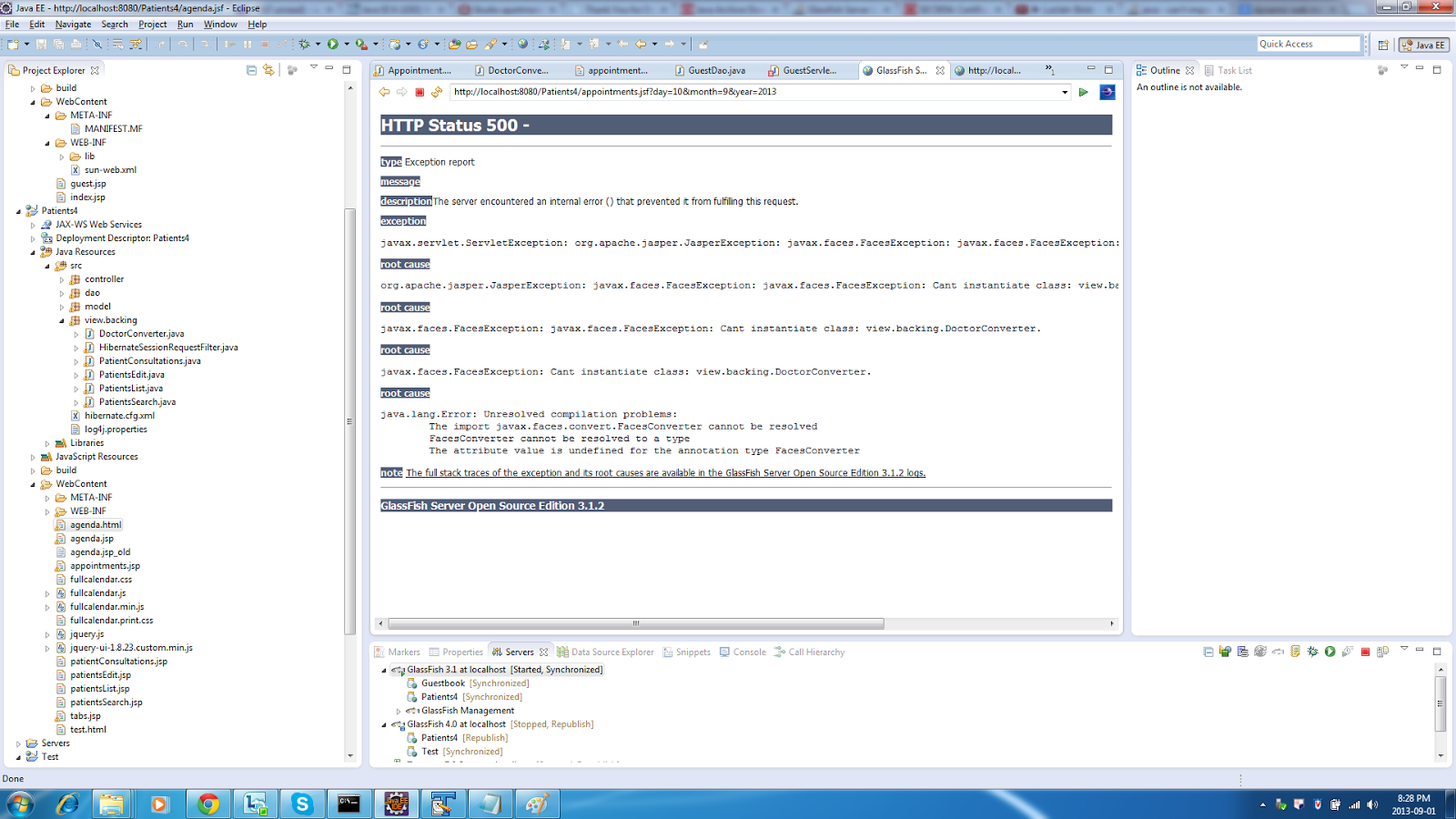
But first I encountered a strange run-time exception, as shown below:

5. After a bit of searching online, it turned out I needed to configure Project Facets to use Dynamic Web Project 3.0, as shown below:

Note: it's very important to select the right Project Facets, because that decides what jars will be used. Fro example, if you don't choose the JSF facet, then you need to add the JSF jars yourself; sometimes there's a good reason to do just that, e.g. the default provided jars won't do the job, so you want to use other jars.

6. As you can see, Eclipse complained about the Java version, so I needed to use the Java 7 compiler, as shown in the following figures:


7. After all this hassle, my application worked, but only with Glassfish 3.1; on 4.0 it throws an NPE; on Tomcat, no way to make it work, even though the same application previously worked ONLY on Tomcat and not on Glassfish ....

By the way, in the past I also had an issue with an application working fine on the former Oracle OAS and not working at all on Tomcat. It turned out that replacing the standard Oracle JSF libs with the ones from Mojarra helped. But you never know ....

I need to investigate this further, but now I'm happy at least I made it work on Glassfish 3.1.

Greetings from the jungle,
    Sorin


P.S. A great article about JSF 2.0 with Glassfish and Eclipse is here: http://balusc.blogspot.nl/2011/01/jsf-20-tutorial-with-eclipse-and.html.


Sunday, June 9, 2013

Sweat, blood and tears with JSF

I'll start with the conclusion: if you're building standard, textbook web applications with Java Server Faces, you're going to love the technology. But the moment you start developing things that are a bit off the beaten track, the fun begins .... Let's take for example the calendar I presented recently. I want to add it some more functionality: when clicking on a certain day, you're redirected to a new page where you can create a new appointment. Once you confirm it, you'll be returned to the calendar page. So, this is how I extended the jQuery calendar:


dayClick: function(date, allDay, jsEvent, view) {
     if (allDay) {
        alert('Clicked on the entire day: ' + date);
        var url = "http://localhost:8080/Patients/appointments.jsf?day=" + date.getDate() + "&month=" + (date.getMonth() + 1) + "&year=" + date.getFullYear();    
        $(location).attr('href',url);  
     } else {
        //alert('Clicked on the slot: ' + date);
     }

}
Note that I've hardcoded the path to the appointment page ("appointments.jsp"). More importantly, I'm passing the date (day, month, year) as URL request parameters, e.g.: http://localhost:8080/Patients/appointments.jsf?day=5&month=7&year=2013

On the appointments.jsp page, one of the things I do is to print the chosen date:
<%
out.println("Data: " + request.getParameter("day") + "-" + request.getParameter("month") + "-" + request.getParameter("year"));
%>
Then, I've added a text input and a button, so that the user can fill in a patient name (or part of it) and click the button in order to search (in a DB) for all patients with the name containing the given text. The patients are supposed to be displayed in a selectOneListBox, as shown below:
<h:inputText binding="#{PatientsSearch.inputText1}" valueChangeListener="#{PatientsSearch.lookForName}" immediate="true" id="inputText1"/>
<h:commandButton value="Patient search:" action="#{PatientsSearch.getPatientsByName}">
</h:commandButton>

<h:selectOneListbox id="patients" value="#{PatientsSearch.selectedPatient}">
<f:selectItems value="#{PatientsSearch.patients}" var="p"
       itemLabel="#{p.name}:#{p.phoneMobile}" itemValue="#{p.name}" />
</h:selectOneListbox>

Almost everything works fine, i.e. if you click the "Patient search" button, the listbox will indeed be filled in with the corresponding patients' names and thus you can select on of the names from the list. I'm saying "almost", because if you change your mind and look up another patient name, clicking the "Patient search" button doesn't produce any result (actually I debugged it and noticed that the handler PatientsSearch.getPatientsByName is indeed called, but somehow the listbox is not refreshed with the new names). If you don't select any name in the list and perform a new patient search, this will work (so clicking the button produces the desired result). It looks as if the listbox is not just a "select one", but "use only once": the moment you select an item from the list, you can't refresh it anymore ....
Anyway, I actually didn't like the list, so I've replaced it with a table:
<h:dataTable var="patient" value="#{PatientsSearch.patients}" style="width:300px;height:150px" rowClasses="oddRow, evenRow">
  <h:column id="name">
    <f:facet name="header">
    <h:outputText value="Name" />
    </f:facet>
    <h:outputText value="#{patient.name}" />
  </h:column>
  <h:column id="phone">
    <f:facet name="header">
    <h:outputText value="Phone" />
    </f:facet>
    <h:outputText value="#{patient.phoneMobile}" />
  </h:column>
  <h:column>
    <h:inputHidden id="patientId" value="#{patient.id}"/>
  </h:column>
</h:dataTable>
I want to show the patient's name in the first column and the patient's phone number in the second. Wait a minute, there are three columns .... The third column contains an inputHidden field, whose value is the patient's ID - patient.id. So, what's the deal with this one ? Well, when I click a row in this table, I want that patient to be selected. Since the patient's ID uniquely identifies each patient, I can't simply use the name (it might not be unique). So I'm going to keep the patient's ID in this hidden field and when the user selects a patient, this ID will be sent to the managed bean that takes care of creating the new appointment using the patient's ID. Compare this with the selectOneListbox above: when I was selecting a patient in the listbox, the selected Patient instance (as a Java type) was passed to the managed bean, as the field PatientsSearch.selectedPatient. So I'm losing this elegance when working with the table, but ok ....

Next, let's do what I've just said: when the user selects a patient from the list, the patient's ID needs to be sent to a backing bean (i.e. we need to preserve it in order to create the appointment later). Again, look how simple was to do that with the selectOneListbox: just add value="#{PatientsSearch.selectedPatient}" and you're done. This is the intrinsic functionality of the listbox. The table however is meant rather for listing data, such as the patients in our case, not necessarily for selecting it. After googling around for a while, I've arrived to the conclusion that all I need to do is:
1. use some jQuery/JavaScript functionality to select a row in the table (and highlight the selection)
2. use a JSF inputHidden field to keep the patient's ID of the selected row

These two steps are shown below. Note that I first reset the background of all "tr" (except for the first, which is the header of the table and thus excluded from any selection) and then I set the background of the selected row to orange.

After that I do step 2 - this single line of code cost me many hours of searches online: $("#j_id_id13\\:testId").val($(this).find('td:last').find('input').attr("value"));
Note that the id of the inputHidden is "testId", but JSF prefixes it with "j_id_id13" when generating the corresponding HTML input field - you can see that by showing the page source in the browser. "\\" are needed to escape ":". Then, $(this).find('td:last') means that I want to go to the last column (td) in the current row (this). Finally, I look for "input" (the HTML field generated) and read its "value" attribute - this is the selected patient's ID.
Another important note: I've displayed the value of the just set hidden field in an "alert", since viewing the browser source doesn't show the hidden field being updated.

$("tr").not(':first').click(
    function () {
      $(this).parent().find("tr").css("background", "");
      $(this).css("background","orange");
      $("#j_id_id13\\:testId").val($(this).find('td:last').find('input').attr("value"));
      alert($("#j_id_id13\\:testId").val());
    }
);

<h:inputHidden id="testId"/>

3. once I have selected the patient (a row in the table) and I click the button "Create appointment", I can retrieve the patient's ID from the hidden field with the following handler in the backing bean:
FacesContext context = FacesContext.getCurrentInstance();  
Map requestMap = context.getExternalContext().getRequestParameterMap();  
String value = (String)requestMap.get("j_id_id13:testId");
        
Patient patient;
if (value != null) {
    patient = getPatientById(value);
}
return "toCalendar";

Now I'm almost done. "Almost" again. Remember I'm on the page "appointments.jsp" and here I click "Patient search". What happens is that I'm basically sent back to the same page in the browser, but then the date line I've shown at the beginning will only display nulls:
<%
out.println("Data: " + request.getParameter("day") + "-" + request.getParameter("month") + "-" + request.getParameter("year"));
%>
That happens because when clicking the button, I'm actually creating a new request for this page, losing thus the URL parameters encoded from the calendar page. So, here's what I can do to preserve the date:
1. write the date into a cookie
2. use again hidden fields to pass the date around
3. do URL rewriting with an onclick JavaScript handler when clicking the "Patient search" button
4. use some form of browser storage (see HTML5, etc.)

And the ideas could just flow like crazy hadn't I found the simplest method:
<h:commandButton value ="Patient search:" action="#{PatientsSearch.getPatientsByName}">
    <f:param name="day" value="#{request.getParameter('day')}" />
    <f:param name="month" value="#{request.getParameter('month')}" />
    <f:param name="year" value="#{request.getParameter('year')}" />  
</h:commandButton>
Note here the EL expressions used to transmit the request parameters to the f:param and thus keep them in the request scope.
That's all folks ! Pffffffffff ....

P.S. I know you'll say there are many JSF plugins which can implement this easier, but sometimes I'm just too conservative ....

Sunday, March 3, 2013

Calendar with data from database: jQuery + servlets + Ajax


I have a Java application that reads appointment data from a database and then shows them in a Java Swing UI. Now I want to publish this application online.
After a bit of research, I've found this convenient jQuery calendar and decided to use it. The main question is  then how to use my existing Java code that reads appointments and expose them to this calendar. So, what I've done:

1. created a Java servlet that reads the database


2. created the jQuery fullcalendar that invokes this servlet


Note here the "url: agenda", which basically means I'm calling the servlet deployed at /agenda.

3. then I realized that I wanted to be able to react to month/week/day changes: whenever I click the previous and next buttons, I should pass the new time period to the servlet, retrieve the new appointments from the DB and show them in the same calendar; this is how I've achieved this:


Saturday, January 19, 2013

Unique in the world


I remember when I started programming how nothing seemed to be impossible. I was completely ignorant to the fact that there were plenty of experienced developers out there who could do the job faster and better than me. I behaved as if I was the only programmer left on Earth.
The years passed and the lesson I've learned is that the freshness of the spirit should never get worn out. Never lose it. Do your work as if you are unique in the world. Don't think about the others, they don't exist - it's just you, and you can do whatever you want to do.

Sunday, January 6, 2013

Another Romanian success story


Hi all and a happy new year !

No, this post is not about Dacia (daciacars.co.uk), but the initial intention was to praise AllView (www.allview.ro), a Brasov-based company, which produces several types of tablets and smart phones. I thought it was great that a Romanian company was a market leader in Romania (according to some studies 40% of tablets sold in Romania are Romanian-made) and it is pushing its products to Germany, Italy, the Netherlands, etc.

However, according to this blog, the only Romanian-made thing inside these AllView tablets is the BitDefender antivirus (www.bitdefender.com), a true Romaian success story. The rest is "made in China".
By the way, a few years ago Microsoft bought GeCAD, another Romanian company which produces the popular RAV Antivirus.
And by the way again, do you know that the second most spoken language at Microsoft is Romanian ? That's what I call a success story.


Tuesday, May 29, 2012

Smart phone ? Yeah, right ....

Last year I finally bought my smartphone - a shiny LG Optimus 2, dual core. I was positively impressed by the flashy look and feel, I loved the applications I could download for free from the Android store - albeit they were mostly games - and of course, I spent late nights playing Angry Birds ....

After a few days of over-enthusiasm, I came back with my feet on the ground. The first "ouch" was when I spent hours to find a simple driver which allowed me to connect my new toy with the laptop. After finally managing that, I got lost trying to copy some files from the laptop to the phone and the other way around. Finally, I got that easier by enabling the Bluetooth between the two devices.

Using GPS was a pain in the a$$ .... At the best I ended up spending huge amounts of money for the mobile Internet. Downloading and using the maps offline was not working properly.

Frustrated, I tried to use the camera - the photos were such a poor quality (bad contrast, ugly colors) that I simply needed to remove them without any regrets.

I've got to the conclusion my phone is too smart, 'cause I've never got to figure out its algorithm for sorting the SMSs. I'm still not able to find the latest one where it should be: on the top of the stack. I went so far that when  I was receiving an SMS, I was removing the SIM-card from the smart a$$ and putting it in my plain old ugly Nokia 1110i, to be able to read that SMS.

The battery is another "great success story": just a few calls and SMSs each day and in two days the battery of my dear smart a$$ is gone .... The same usage pattern with Nokia 1110i takes close to eight days without recharge !


In short:


LG Optimus 2, dual core
(bought in May 2011)
Nokia
(bought in January 2007)
Battery
2 days (if you’re lucky)
8 days
GPS
Useless
-
Startup time
~ 60 seconds
3 seconds
Camera
Useless
-
SMS
Mixes up SMSs, can’t find the latest
Good, logical sorting
Price
480 Euros
20 Euros


The latest experience was something reminding an opera buffa. I moved from the Netherlands to Romania and I adjusted the time (it's one hour later in Romania). It was the night of daylight saving time, so I knew the time would be set one extra hour ahead. I did that manually and I specifically instructed the smart a$$ to not automatically adjust the time settings. After that I set the alarm clock at 7 am and I went to bed. I woke up with the alarm ringing loud, I stopped it and - after the usual swears - I rushed out. But I got a hunch: why was it so dark outside ? I turned on the TV to notice it was 6 am. So my smart .... whatever .... managed to set the time again one hour ahead, even though I had specifically instructed it not to do that ....

Did I mention than when I change the countries, my smart .... thing .... changes the language automatically ? When I move among FR, DE, NL, UK, IT, ES, PT, RO, etc. this is usually not a problem, but what am I gonna do in China or Israel or some Arabic country ? I wouldn't even be able to set the language back to English.
Anybody needs a smartphone ?

Update 1: Some people would say "get an iPhone, man". Possibly, for what you pay it should be a class above the other smart a$$es.


Update 2: Smartphones are wrecking the planet ....


Sunday, December 11, 2011

Java Pet Store 2.0 - the architecture (part 1)

To my surprise, the Java Pet Store 2.0 page, even though recently updated, still doesn't mention much about the design of the application.
So here we go, below you find some diagrams and explanations over how it's built and how it works. I'll continue the story in future posts, here I start with the overview and show how the catalog gets displayed.

First, check out this part of the web.xml file:

<servlet>
        <display-name>ControllerServlet</display-name>
        <servlet-name>ControllerServlet</servlet-name>
        <servlet-class>com.sun.javaee.blueprints.petstore.controller.ControllerServlet</servlet-class>
    </servlet>
    <servlet-mapping>
        <servlet-name>ControllerServlet</servlet-name>
        <url-pattern>/catalog</url-pattern>
    </servlet-mapping>

It tells that the ControllerServlet needs to be used for URLs that match the pattern "/catalog".
For example, when following the link "Dogs" on the main page, we navigate to:
http://localhost:8087/petstore/faces/catalog.jsp?catid=Dogs
(I have Glassfish running on localhost:8087)
Since this matches the "/catalog" pattern, ControllerServlet.service() is triggered, as shown in Figure 2.
The ControllerServlet implements the FrontController J2EE pattern and delegates to various actions (see Figure 1 and Figure 2), depending on the servlet path. In this case the servlet path is "/catalog" and it maps to CatalogXmlAction. The latter reads the "command" parameter from the request and, because this one is "categories", it calls the CatalogFacade to get the categories via JPA (note in Figure 1 that "Category" is a JPA Entity).


Figure 1: The main entities involved in fetching the catalog

Figure 2: Displaying the catalog

The CatalogXml action, once it has the categories, it writes them to the response (HttpServletResponse) in JSON format (see below).
So how come, given this JSON format, the categories and the pets are so nicely displayed in the page (see Figure 3) still ?  Well, this is done with a bit of Dojo/JavaScript magic. 


[{"id":"CATS","catid":"CATS","name":"Cats","description":"Loving and finicky friends","imageURL":"cats_icon.gif",
"products": [{"id":"feline01","catid":"CATS","name":"Hairy Cat","description":"Great for reducing mouse populations",
"imageURL":"cat1.gif"},{"id":"feline02","catid":"CATS","name":"Groomed Cat","description":"Friendly house cat keeps you 
away from the vacuum","imageURL":"cat2.gif"}]},
etc.
]


Figure 3: The Pet Store application - after choosing the categories

Take a look at catalog.js, which is used in catalog.jsp to format the page:

function loadAccordion () {
        // go out and get the categories
        // this should be made more geric
        var bindArgs = {
            url:  applicationContextRoot + "/catalog?command=categories&format=json",
            mimetype: "text/json",
            load: function(type,json) {
               ac.load(json);
               processURLParameters();
             },
             error: ajaxBindError
        };
        dojo.io.bind(bindArgs);
    }


This method is called from initCatalog() in catalog.js, which in turn is called in catalog.jsp:

<script type="text/javascript">
    dojo.event.connect(window, "onload", function(){initCatalog();});
</script>


Finally, loadAccordion() calls ac.load(json) and ac.showCategory(params.catid), where "ac" is AccordionMenu() (the menu with categories in Figure 3), which again, sends us to:


this.load = function(lcategories) {
        categories = lcategories;
        // create all the rows
        for (var l=0; l &lt; categories.length; l++) {
            var row = createRow(l,"accordionRow", ITEM_HEIGHT);
            createLinks(row.div, categories[l].name, l, "accordionLink");
            divs.push(row);
        }
    }

Here, createLinks() makes the links on the left-hand side menu ("Cats", "Dogs", etc.), using categories[l].name as parameter. "Categories" come from the JSON shown above, retrieved in loadAccordion(): url:  applicationContextRoot + "/catalog?command=categories&format=json".

this.showCategory = function(catid) {
        for (var l=0; l < categories.length; l++) {
            if (catid == categories[l].name) {
                // now tell the scroller to load the first product
                initiateExpansion(l);
                if (categories[l].products[0]) {
                    dojo.event.topic.publish("/catalog", {type:"showProducts", productId:categories[l].products[0].id});
                } 
                break;
            }
        }
    }

Notice here "type" and "productId" labels. Back in catalog.js, we do:
dojo.event.topic.subscribe("/catalog", this, handleEvent);

So here we subscribe to the "/catalog" events with the callback "handleEvent", which does:

else if (args.type == "showProducts") {
          is.reset();
          populateItems(args.productId, 0, 0, true);
      }


Here, args.type is the label "type" we published above and args.productId is the label "productId". With the argument args.productId, "populateItems()" displays the images, etc. In order to do that, it uses DOM fields from catalog.jsp, e.g.:


var targetElement = document.getElementById("bodySpace");

To be continued ....