Showing posts with label eclipse. Show all posts

Sunday, January 5, 2014

Maven tips and tricks


Maven is cool. Reading the official tutorial on the Maven website, you get a pretty good idea what it does and how it works. The tutorial fails to tell you though the most important thing: follow the Maven conventions and it will work fine; if you don't follow them, Maven won't help, better forget about it.
One of the Maven conventions is the standard directory layout (read here). As long as your project's directory structure looks like in the following figure, using Maven is ok:


Note that under the src/main you need to have your "java" directory for the java source code, "webapp" for the JSP/JSF pages (the eventual web application) and "resources" for some important files (read on, I'll give an example).

However, if you happen to develop a web application under Eclipse, your directory structure will be quite different:


Trying to use Maven now to build and deploy this Eclipse project is doomed to fail. The simplest solution to produce the war you need is to use Export from File menu under Eclipse and choose Web -> "WAR file".

For my own purposes I needed to use Maven, so I first moved the Eclipse project around in order to mimic the directory structure desired by Maven (as shown in the first figure above). From that point on, I learned some simple lessons:

1. as you've noticed, whenever you run a Maven phase/goal, Maven downloads all libraries necessary and places them under your local C:\Users\myUserName\.m2\repository; this is very powerful, as you can use Maven out of the box with a "tabula rasa" computer and end up with a neatly deployed project with all references solved

2. I wanted to add to my Maven project a dependency to an existing jar, so here it's what I've done:

   mvn install:install-file -DgroupId=com.mycompany.test -DartifactId=testid -Dversion=1.0 -Dpackaging=jar -Dfile=/path/to/jarfile/f.jar

This resulted in copying the desired dependency, f.jar, somewhere under .m2/repository.

I added then the following to my pom.xml:
<dependency>
     <groupId>com.mycompany.test</groupId>
     <artifactId>testid</artifactId>
     <version>1.0</version>
 </dependency>


3. by the way, while running mvn package you'll most likely get error messages referring to missing classes; to fix this, just look for the missing class online, e.g.:


Containing JAR files:

As you can see, findjar.com gives you links to Maven2 repositories. Following these links will tell you what artifactId and version you'll need to include in your pom.xml in order to fix this dependency.

Or even better, just go to the Central Maven Repository and look there for the missing class. Finally you'll get to the page that shows you exactly what you need to include in your pom.xml (you can copy-paste it):


4. if you're using Hibernate (high likelihood I'd say), add your hibernate.cfg.xml to /src/main/resources; moreover, all other Hibernate configuration files, e.g. Patient.hbm.xml, must be added to the corresponding /resources subdirectory; I needed to add all my .hbm.xml files to /src/main/resources/model; after you run mvn package, they end up in the war file under WEB-INF\classes\model

5. since you're packaging a web application, add the following to your pom.xml:


 <build>  
    <plugins>  
     <plugin>  
      <groupId>org.apache.maven.plugins</groupId>  
      <artifactId>maven-war-plugin</artifactId>  
      <version>2.4</version>  
     </plugin>  
    </plugins>  
 </build>  

------------------

The following is the pom.xml file I'm using for my project:

 <project xmlns="http://maven.apache.org/POM/4.0.0"  

  xmlns:xsi="http://www.w3.org/2001/XMLSchema-instance"  
  xsi:schemaLocation="http://maven.apache.org/POM/4.0.0  
            http://maven.apache.org/xsd/maven-4.0.0.xsd">  
  <modelVersion>4.0.0</modelVersion>  
  <groupId>com.mycompany.app</groupId>  
  <artifactId>app</artifactId>  
  <version>1.0-SNAPSHOT</version>  
  <packaging>war</packaging>  
  <dependencies>  
   <dependency>  
    <groupId>junit</groupId>  
    <artifactId>junit</artifactId>  
    <version>3.8.1</version>  
    <scope>test</scope>  
   </dependency>  
   <dependency>  
     <groupId>javax.servlet</groupId>  
     <artifactId>javax.servlet-api</artifactId>  
     <version>3.0.1</version>  
     <scope>provided</scope>  
   </dependency>  
   <dependency>  
     <groupId>org.hibernate</groupId>  
     <artifactId>hibernate-core</artifactId>  
     <version>3.6.3.Final</version>  
   </dependency>  
   <dependency>  
     <groupId>javax.faces</groupId>  
     <artifactId>jsf-api</artifactId>  
     <version>1.2_02</version>  
   </dependency>  
   <dependency>  
     <groupId>org.apache.openejb</groupId>  
     <artifactId>openejb-jee</artifactId>  
     <version>3.1.1</version>  
   </dependency>  
   <dependency>  
     <groupId>commons-logging</groupId>  
     <artifactId>commons-logging</artifactId>  
     <version>1.1.3</version>  
   </dependency>  
   <dependency>  
     <groupId>com.mycompany.test</groupId>  
     <artifactId>testid</artifactId>  
     <version>1.0</version>  
   </dependency>  
  </dependencies>  
  <build>  
    <plugins>  
     <plugin>  
      <groupId>org.apache.maven.plugins</groupId>  
      <artifactId>maven-war-plugin</artifactId>  
      <version>2.4</version>  
     </plugin>  
    </plugins>  
  </build>  
 </project>  


Enjoy Maven, folks !

Sunday, October 27, 2013

Write Once Run Anywhere .... if you can

Let's see. A few weeks back my hard-drive crashed and I needed to replace it. Luckily, I had saved my data previously, among which a Java-based application with 3 tiers: JSF, jQuery, servlets, and an open-source database. I wanted thus to resurrect this application. "Piece of cake" I told to myself, Java is after all WORA (Write Once Run Anywhere).
So this is what I've done:

  1. downloaded and installed Eclipse Juno (which didn't start on double-clicking the exe, but rather using this command line: C:\eclipse\eclipse.exe -vm "C:\Program Files\Java\jre7\bin")

  2. I want to run this application on Apache Tomcat and Glassfish application servers, so after downloading and installing both, I needed to download server adapters, as shown in the following figure (see "Download additional server adapters" in the figure below)

Note that I tried first with Glassfish 4.0.

3. I created a Dynamic Web Project in Eclipse and imported the sources of my project (saved from the previous hard-drive)

4. Then, as I was building the project, I noticed missing required jar files, so I started looking for them (either jarfinder.com or findjar.com) and adding them to \WEB-INF\lib

At this point in time I thought everything should work fine. 
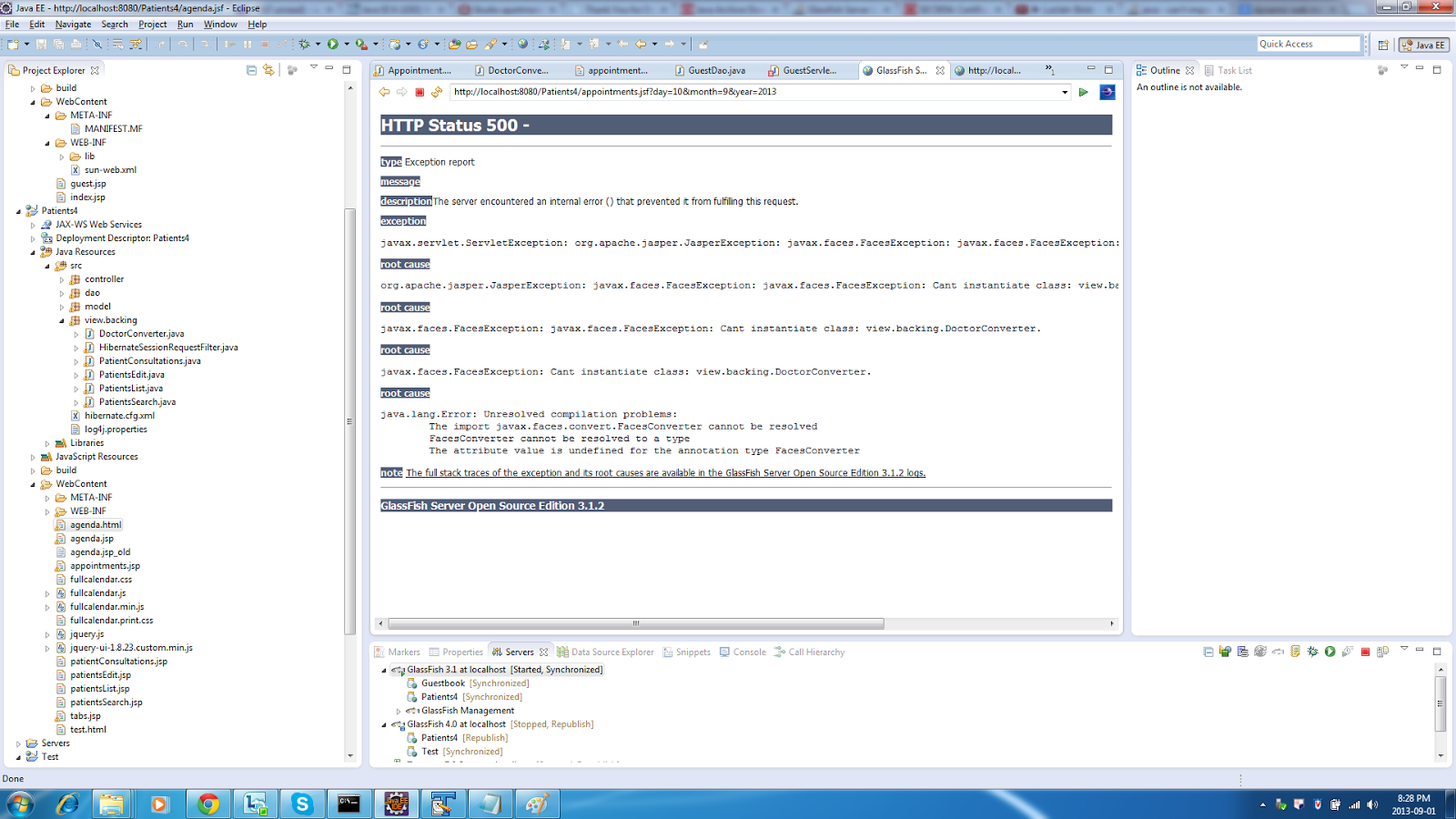
But first I encountered a strange run-time exception, as shown below:

5. After a bit of searching online, it turned out I needed to configure Project Facets to use Dynamic Web Project 3.0, as shown below:

Note: it's very important to select the right Project Facets, because that decides what jars will be used. Fro example, if you don't choose the JSF facet, then you need to add the JSF jars yourself; sometimes there's a good reason to do just that, e.g. the default provided jars won't do the job, so you want to use other jars.

6. As you can see, Eclipse complained about the Java version, so I needed to use the Java 7 compiler, as shown in the following figures:


7. After all this hassle, my application worked, but only with Glassfish 3.1; on 4.0 it throws an NPE; on Tomcat, no way to make it work, even though the same application previously worked ONLY on Tomcat and not on Glassfish ....

By the way, in the past I also had an issue with an application working fine on the former Oracle OAS and not working at all on Tomcat. It turned out that replacing the standard Oracle JSF libs with the ones from Mojarra helped. But you never know ....

I need to investigate this further, but now I'm happy at least I made it work on Glassfish 3.1.

Greetings from the jungle,
    Sorin


P.S. A great article about JSF 2.0 with Glassfish and Eclipse is here: http://balusc.blogspot.nl/2011/01/jsf-20-tutorial-with-eclipse-and.html.


Saturday, April 2, 2011

Eclipse tips and tricks (episode)

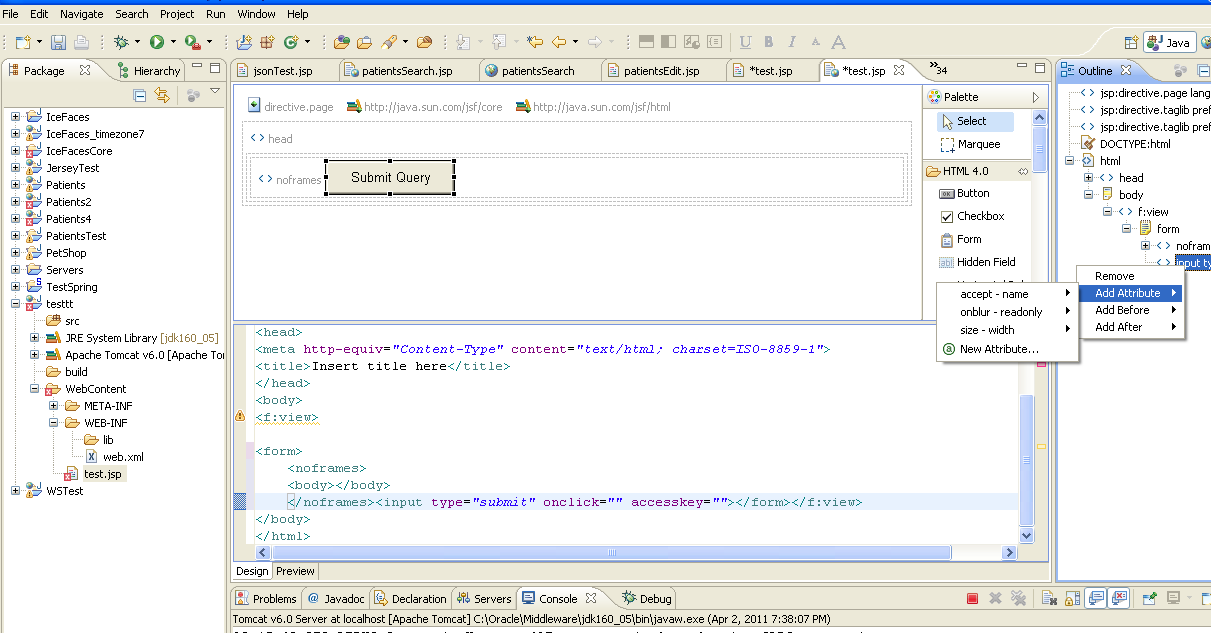
Whenever you have a JSP page opened in Eclipse, the standard editor, called JSP Editor is not very fancy. However, do mouse right-click on the file name and choose Web Page Editor. The result is much more interesting, since it shows you the look and feel (Design tab) of the page as well as the source code. In the top-right corner of the window you have the Palette, which enables fast design by drag-and-dropping controls to the page. More to the right you have the Outline window, which allows you to select any tag of the page and add attributes to it.
This is similar to the powerful Oracle JDeveloper's editor.

Next figure illustrates the Web Page Editor in Eclipse.

Sunday, November 21, 2010

Debugging Java PetStore with Glassfish and Eclipse

Once I made PetStore work in Glassfish, I wanted to debug it in Eclipse.

1. I ran asadmin in my application server path:
C:\J2EE\Sun\AppServer\bin>asadmin start-domain

2. In the browser, I ran the application server Admin Console, available in my case at localhost:4848

3. I went to Application Server menu (top left), I chose JVM Settings and I enabled Debug

4. I restarted the Application Server (after enabling Debug and saving this configuration, I noticed the link "Restart needed" top left; I clicked on it, after that I ran asadmin start-domain from the console)

5. I also ran asadmin start-database to start the database for PetStore

6. I started Eclipse (I use version 3.4.1); under Run menu, I chose "Debug configurations ...."; then I chose the PetStore project (which I had created previously in Eclipse) and port 9009 (the default port where Glassfish is listening for debuggers); I also enabled "Allow termination of remote VM"

7. Just for the test, I put a breakpoint in ImageAction.java, method service; then I started the debug configuration created at bullet 6; finally, I navigated in a browser to
 http://localhost:8087/petstore/faces/catalog.jsp
and I clicked a dog under Pets; I could see my breakpoint being hit.